
Final Expense Agent Training
Build your
virtual sales desk.
Sell professionally from anywhere you're licensed.
Virtual final expense sales combines a professional workspace, reliable technology, structured sales training, outbound lead flow, dialing tools, CRM organization, and disciplined daily activity into one remote sales process.
- AI Dialer
- CRM
- Lead Flow
- Training
- Quoting
- Follow-Up
- Workspace
- Technology
- Leads
- Dialing
- Sales
- Follow-Up
- 01Leads
- 02Dialer
- 03Conversation
- 04Quote
- 05Application
- 06CRM
- 07Follow-up
Virtual does not mean casual
Remote sales still require a professional system.
Selling by phone eliminates many of the logistical requirements of field sales, but it does not eliminate the need for preparation, professionalism, organization, product knowledge, or consistent activity.
Home office≠Casual business
Home office+Professional system
Virtual agents still need
A focused workspace
Reliable connectivity
Clear audio
Organized leads
A repeatable sales process
Accurate quoting
Reliable follow-up
Proper licensing
Professional communication
Why virtual agents lose consistency.
These are operational problems, not personal failures. Each one is a reason the system matters.
- 01
Distractions
Household activity, notifications and open tabs pull attention away from the conversation. - 02
Unreliable technology
Dropped calls, poor audio and slow logins interrupt the call block. - 03
No daily routine
Without set blocks, activity depends on how the day happens to go. - 04
Disorganized follow-up
Callbacks kept in memory or on scraps of paper get missed. - 05
Inconsistent sales process
Every call running differently makes it hard to see what to improve.
Your workspace
Build a professional command center.
The workspace should make it easier to focus, communicate clearly, access the necessary tools, and work consistently.
- Quiet workspace
- Wired or reliable internet
- Professional audio
- Computer
- Second display, optional
- Dialer access
- CRM
- Training resources
- Notes / follow-up
Non-negotiable · Focused workspace
The Silent Chamber
Have a quiet, consistent place for phone conversations whenever possible. Excessive background noise can make communication harder and come across as less professional.
Door or separation from household activity
Minimal television and music
Limited interruptions
Comfortable seating
Proper lighting
Organized desk
Private handling of client information
Non-negotiable · Reliable connectivity
The Hardwired Connection
Call quality matters. A stable wired connection is preferred where practical and recommended for consistency, because it can reduce some wireless reliability issues.
Stable broadband connection
Low call disruption
Backup connectivity plan
Updated browser
Current operating system
Reliable power
When technology fails.
Plan it before it happens. General backup options:
- Mobile hotspot
- Secondary connection
- Relaunch the dialer
- Keep CRM notes saved
- Schedule a callback
- Know your support contact
Non-negotiable · Clear communication
High-Fidelity Audio
The prospect needs to hear you clearly, and you need to hear details accurately. No specific brand is required.
Quality microphone
Comfortable headset
Noise isolation
Reliable connection
Proper microphone placement
Comfort during long calling sessions
Poor environment
- Background noise
- Echo
- Inconsistent volume
- Interruptions
Professional audio
- Clear speech
- Consistent volume
- Minimal distraction
- Natural conversation
Before your first dial.
The engine
Your virtual sales tech stack.
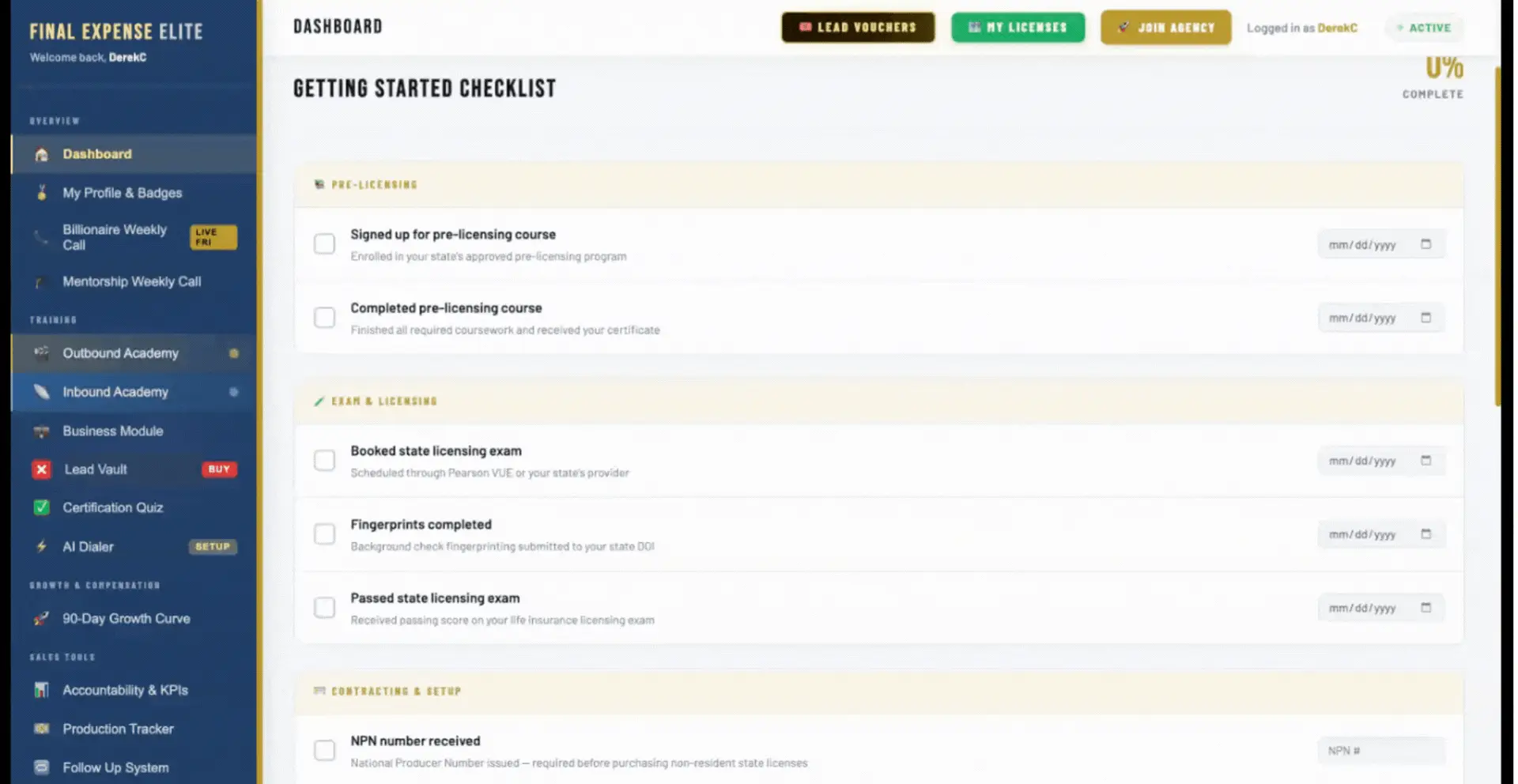
The Elite Tech Stack puts the tools of a virtual sales day around one workflow. This diagram shows the Final Expense Elite workflow — some pieces are integrated tools rather than proprietary software.
Final Expense Elite workflow · conceptual
Outbound activity
From lead queue to live conversation.
The dialer helps organize outbound activity and reduces the time agents spend manually placing individual calls. It doesn't pick the "best" prospect, guarantee live conversations, or eliminate voicemail — it keeps the call block moving so more of your time goes to conversations.
Before the call
The sales day starts with an organized pipeline.
- 01Lead enters system
- 02Assigned / available
- 03Dialing queue
- 04Contact attempt
- 05Conversation
- 06Disposition
- 07Follow-up or application
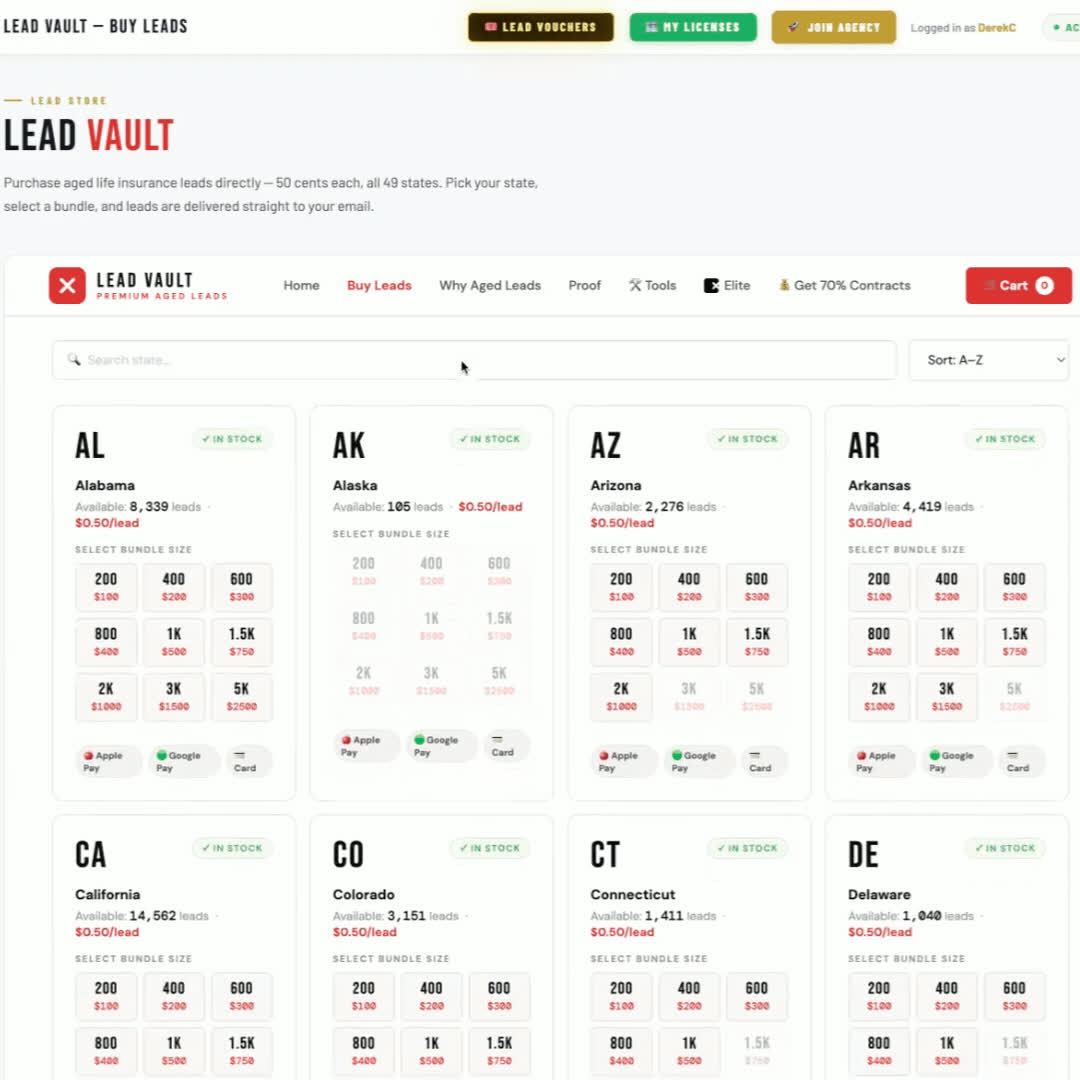
Outbound lead program
Lead access is part of the workflow.
Final Expense Elite includes lead access as part of the virtual sales workflow, so agents can focus on conversations instead of sourcing contacts.
Response time
Don't let opportunity sit.
When a lead needs timely follow-up, an organized virtual system makes it easier to move from lead availability to contact attempts — without driving between appointments.
- 01Lead available
- 02Queue
- 03Call
- 04Disposition
- 05Follow-up
Two structures, not a ranking
Field model
- Travel between appointments
- Geographic radius
- In-person scheduling
Virtual model
- No travel between calls
- Centralized tools
- Broader licensed territory potential
- Faster transition between scheduled conversations
The workday
Build a routine you can repeat.
One example of how a day can be structured. It isn't mandatory — adjust it to your schedule and licensed territory.
Example workflow
- 01
Prep
- Review scheduled follow-ups
- Check systems
- Licensing / carrier access if needed
- Prepare lead queue
- 02
Call block
- Outbound activity
- Conversation notes
- Dispositions
- Scheduled callbacks
- 03
Midday reset
- Review activity
- Administrative work
- Follow-up
- Prepare next block
- 04
Call block
- Outbound activity
- Scheduled callbacks
- Applications
- 05
Follow-up
- Return calls
- Pending information
- Application follow-up
- 06
Review
- Update notes
- Review the day
- Tomorrow's priorities
Focus
Protect the call block.
- Silence unrelated notifications
- Close unnecessary browser tabs
- Keep phone distractions away
- Open required tools before dialing
- Schedule admin work separately
- Share work hours with your household
- Take reasonable breaks
When someone answers
The technology gets you to the call. The training guides the conversation.
- 01Connect
- 02Open
- 03Discover
- 04Present
- 05Handle questions
- 06Confirm next step
One call, one connected system.
- 01Lead
- 02Dialer
- 03Opening
- 04Discovery
- 05Quote
- 063-Policy presentation
- 07Objection framework
- 08Application / follow-up
- 09CRM
Phone-first communication
When they can't see you, clarity matters more.
Pacing
Slow enough to follow, steady enough to keep momentum.
Tone
Calm and even — see tone training in the Objection Handling Guide.
Listening
Let the client finish; the details matter later.
Pauses
Give room to think and respond.
Clear explanations
Plain language, one idea at a time.
Verbal signposting
Say where the conversation is going next.
Confirming understanding
Check before moving on.
Not interrupting
Talking over someone is harder to recover from on the phone.
Documenting details
Note what matters while it's fresh.
Training example · Verbal signposting
In person, clients can follow paperwork visually. On the phone, transitions need to be said out loud. Example phrases, not required script lines:
- Agent
“Let me explain the difference between these options.”
- Agent
“Before we move on, let me make sure that part was clear.”
- Agent
“Based on what you told me earlier…”
- Agent
“Next, we'll look at…”
Checking for understanding
- 01Explain
- 02Pause
- 03Check
- 04Clarify
- 05Continue
From discovery to options
Don't let the quote break the flow.
- 01Discovery complete
- 02Client information
- 03Appropriate products
- 04Build options
- 05Present
- 06Client questions
After the decision
Move cleanly into the application.
Once a client chooses to proceed, the agent moves accurately through the appropriate carrier's application process. Not every carrier uses the same process. A streamlined remote workflow can reduce unnecessary administrative friction.
- 01Confirm information
- 02Open the correct carrier process
- 03Complete required fields
- 04Review for accuracy
- 05Signatures / authorization
- 06Submit per carrier process
- 07Track next steps
Submission is not coverage
Application → Carrier process → Possible outcomes
- Approved
- Modified / alternative outcome
- Additional information
- Pending
- Declined
Call length and processing time vary with the client, product, carrier, application requirements and underwriting.
After the call
Follow-up should not live in your memory.
- 01Contact
- 02Disposition
- 03Note
- 04Next action
- 05Follow-up date
- 06Outcome
Scheduled callback
The client asked to continue later.
Missing information
Additional details are needed.
Application follow-up
Carrier or application status needs action.
Family / decision-maker
Another person needs to join.
General nurture
A legitimate prospect who isn't ready now.
A clear no is final
Follow-up never justifies repeatedly contacting someone who declined further contact.
Improvement
Don't only count sales. Review the process.
End-of-day review areas
Calls attempted
Live conversations
Scheduled follow-ups
Applications
Call length where useful
Objections encountered
Where conversations ended
Incomplete applications
Tasks for tomorrow
Performance feedback loop
- 01Activity
- 02Conversations
- 03Outcomes
- 04Review
- 05Coaching
- 06Adjustment
- 07Next call block
Your licensed territory
Remote sales can expand your reach.
Virtual selling can let you work with prospects in multiple states where you're properly licensed and otherwise permitted to sell. A license in one state does not allow nationwide selling.
- 01Home state
- 02Additional approved licenses
- 03Broader licensed territory

Where this fits
The virtual workflow builds in stages.
Days 1–30 · Foundation
Workspace · Licensing · Technology · Scripts
Days 31–60 · Volume
Dialing · Lead management · Follow-up · Objection handling
Days 61–90 · Optimization
Call review · Coverage presentation · Additional licensing · Consistency
Final Expense Elite
A virtual business is more than a phone.
The system provides the infrastructure. The agent still runs the business.
The system
- Training
- Lead infrastructure
- Dialing tools
- CRM access
- Licensing resources
- Sales frameworks
- Agent Dashboard and resources
- Support
The agent
- Professional workspace
- Licensing completion
- Consistent activity
- Accurate client information
- Follow-up
- Training practice
- Professional communication
- Execution
Two different ways to sell.
Field sales
- In-person meetings
- Travel time
- Local scheduling
- Physical paperwork may be involved
- Face-to-face communication
Virtual sales
- Remote conversations
- No travel between calls
- Centralized technology
- Digital applications where supported
- Broader potential territory when properly licensed
Different agents and clients prefer different models. Neither is universally better.
New to virtual sales?
Build the environment before you build the volume.
- 01Licensing
- 02Workspace
- 03Technology
- 04Script training
- 05Practice
- 06Dialing
- 07Review
Already selling?
Audit the system around your calls.
Is your workspace reliable?
Are leads organized?
Is follow-up centralized?
Are applications slowing down the workflow?
Are you reviewing recurring objections?
Are your tools integrated enough?
Are manual steps wasting time?
What to avoid
Ten ways to make remote sales harder than it needs to be.
- 01
A distracting environment
Noise and interruptions make every call harder.
- 02
Poor audio
If they can't hear you, nothing else lands.
- 03
Unstable connectivity
Dropped calls break trust and momentum.
- 04
No plan for the day
Activity drifts without set blocks.
- 05
Not knowing the script
Structure frees you to listen.
- 06
Too many unrelated tools open
Every extra tab is a context switch.
- 07
Weak follow-up notes
The next call starts from scratch.
- 08
Rushing applications
Errors cost more time than they save.
- 09
Ignoring call review
The same issue keeps repeating.
- 10
Ignoring licensing boundaries
Only sell where you're licensed and appointed.
Virtual telesales operating checklist
Master the complete virtual conversation
FAQ
Virtual telesales questions
What is virtual final expense telesales?
Selling final expense insurance by phone from a professional remote workspace, using a structured sales process, outbound lead flow, dialing tools, CRM organization and consistent daily activity.
Can final expense insurance be sold virtually?
Yes. Final Expense Elite trains agents around phone-based, virtual sales workflows. Selling remotely does not grant nationwide authority: agents must still hold the appropriate license for the client's state, follow applicable carrier and state requirements, use carrier-approved application processes, and complete any required appointments and contracting.
What equipment do I need for virtual final expense sales?
The general workstation covered on this page: a reliable computer, a stable internet connection, a quality headset and microphone, a quiet professional workspace, and access to the dialer, CRM, quoting tools and carrier portals used in your setup. There is no requirement to buy expensive equipment beyond a dependable workstation.
Do I need a dedicated home office?
A separate room isn't required, but a quiet, consistent space where client conversations and information stay private is strongly recommended.
Do I need a wired internet connection?
A wired connection is preferred where practical because it can reduce some wireless reliability issues. What matters is a stable connection and a backup plan.
What type of headset should I use?
A comfortable headset with a clear microphone and good noise isolation that you can wear through a full call block. No specific brand is required.
How does the Final Expense Elite dialer fit into virtual sales?
The dialer organizes outbound activity and reduces the time spent manually placing individual calls, so more of the call block goes to conversations. Scripts are one click away in the Agent Dashboard while you dial.
How are leads handled in the virtual workflow?
Leads enter the system, move into a dialing queue, and every contact attempt ends with a disposition that points to the next action: follow-up, application, or closed.
How does the CRM help with follow-up?
It keeps notes, statuses, next actions and follow-up dates in one place, so follow-up doesn't depend on memory.
How are final expense applications completed remotely?
Through the appropriate carrier's application process: confirm information, complete required fields accurately, follow the carrier's signature or authorization steps, submit, and track next steps. Processes differ by carrier.
Do I need multiple state insurance licenses?
You need the appropriate license for each state where your clients are. Additional licenses can broaden your licensed territory; see the state licensing guides.
How does the sales script work in virtual telesales?
It gives every call the same structure — Open, Discover, Present, Close, Follow up — so the conversation stays clear even when the client can't see you.
How does objection handling change over the phone?
The framework stays the same (Empathize, Isolate, Pivot, Confirm), but tone, pacing and checking for understanding matter more because the client can't see you.
What is the 3-Policy Strategy?
A training framework for presenting three appropriate coverage options — Budget, Recommended and Legacy — built from discovery.
How does Virtual Telesales 101 fit into the 90-Day Roadmap?
Workspace and technology set-up happen in Days 1–30, dialing and follow-up build in Days 31–60, and call review and additional licensing are refined in Days 61–90.
Does virtual selling guarantee more sales than field selling?
No. Virtual and field sales are different models. Results depend on the agent's own activity, skill and consistency.
Build your virtual sales system
The workspace is ready. The tools are connected. Now build the repetitions.
Final Expense Elite connects agent training, outbound lead infrastructure, dialing tools, CRM organization, licensing resources, and sales frameworks into one virtual operating system.